Three letters decide half of your build. ATX, micro-ATX, mini-ITX — you've seen them on product pages, you've nodded along, and then you've bought the wrong case. I know, because I did it twice.
Here's the thing nobody tells you upfront: the motherboard form factor is a mechanical contract. It fixes the dimensions of the board, where the screw holes sit, and what can physically plug into it. Everything else — the graphics card, the CPU cooler, the number of drives, even the airflow inside the case — is downstream of that contract. Get it wrong and you'll return a case that seemed perfect on paper.
So let's go through the three formats that actually matter in 2026, with the real numbers, the real trade-offs, and the mistakes I made so you don't have to.
Key takeaways
- ATX measures 305 × 244 mm, micro-ATX 244 × 244 mm, mini-ITX 170 × 170 mm.
- The smaller the board, the fewer RAM slots, PCIe slots and SATA ports you get — that's the actual cost, not the price tag.
- Mini-ITX is the smallest of the three, but not the smallest that exists: E-ATX sits above ATX and Thin Mini-ITX sits below.
- Pick the form factor before you buy the case. Always. The case is the expensive mistake.
- A micro-ATX board usually fits inside an ATX case. The reverse is never true.
- Small doesn't automatically mean hot, but it does mean every millimetre of clearance counts.
Motherboard form factors explained: what the letters actually mean
A form factor is a standardised set of physical specifications. It's not about performance, chipset or socket. It's about geometry — and geometry is what decides whether two parts can coexist.
The specification defines four things:
- The board dimensions, in millimetres.
- The position of the mounting holes, so the standoffs in your case line up.
- The location of the rear I/O panel, so it matches the cutout in the case.
- The expansion slot spacing, so PCIe cards land where the case has brackets.
That last point is where people get burned. A board can be the right size and still not fit your case, because the slots don't line up with the openings.
Why the choice locks in everything else
When I built my first small-form-factor machine, I ordered a mini-ITX board and a compact case in the same week. Both were "mini-ITX compatible". The CPU cooler I'd chosen was 158 mm tall. The case accepted coolers up to 71 mm. Both products were honest. I was not.
That's the pattern: the form factor doesn't restrict you directly, it restricts you through a chain of clearances. Cooler height, GPU length, PSU depth, cable routing space. Each one is a separate number you have to check, and they all trace back to the board's footprint.
ATX: the default for a reason
The full-size ATX board is the one most people picture when they hear "motherboard". It measures 305 × 244 mm, and it's been the reference standard for so long that "ATX case" and "PC case" are basically synonyms in most shops.
What you get for that surface area:
- Up to four DIMM slots — meaning 128 GB of RAM is trivially easy and 192 GB is possible on current consumer platforms.
- Six or seven PCIe slots, though in practice you'll use two at most.
- Plenty of SATA ports and fan headers, spread far enough apart that cable management doesn't become an art project.
- Room for the biggest air coolers on the market without measuring anything.
My honest opinion: if you're building a workstation, a machine you plan to upgrade for five years, or anything with more than one PCIe card, buy ATX and stop overthinking it. The extra board surface is cheap. The flexibility is not.
The catch with ATX
It's big. A mid-tower ATX case occupies real volume — often 40 to 50 litres — and that's before you consider that you'll need desk space or floor space for it. ATX also doesn't give you anything you can't get elsewhere for a mainstream gaming build with one GPU. People buy ATX out of habit more than need.
Micro-ATX: the middle child that quietly wins
Here's a fact that surprises almost everyone: micro-ATX is 244 × 244 mm. It's not a scaled-down ATX. It's a square.
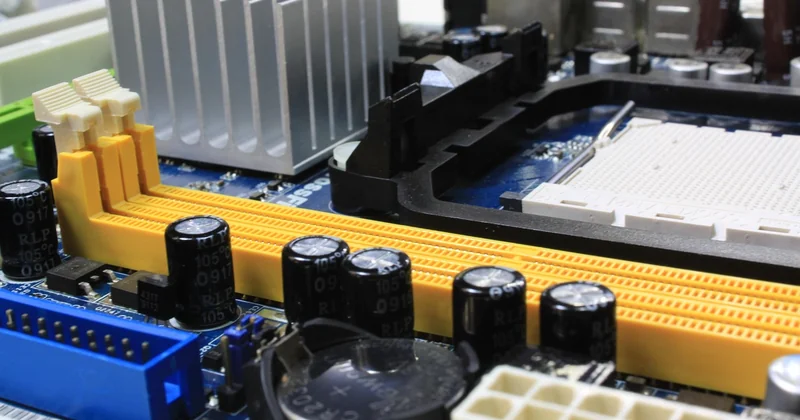
That square keeps the full 244 mm of depth from ATX, which means the rear I/O, the CPU socket position and the first PCIe slot all sit in the same place. Which is why a micro-ATX board drops straight into an ATX case with zero drama. You'll just see empty space below it.
What you give up is mostly horizontal: typically four DIMM slots on decent boards, two on cheap ones, and four expansion slots instead of seven. You keep the first x16 slot for your GPU, and you usually keep a second one. For the overwhelming majority of builds, that's all you need.
Is micro-ATX the smart default in 2026?
Yes — and I'll defend that position. Micro-ATX boards cost less than equivalent ATX boards for the same chipset, and they fit in a wider range of cases. The only real penalty is aesthetic: a micro-ATX board in an ATX case leaves a visible gap, and some people hate that.
If you're building a normal gaming PC with one graphics card and two RAM sticks, micro-ATX is the rational choice. ATX is the emotional one. Both are fine. I've done both.
Mini-ITX: the smallest of the mainstream three
Of the three formats discussed here, mini-ITX is the smallest, at 170 × 170 mm. It's a square roughly the size of your hand, and it has to fit a CPU socket, two RAM slots, one PCIe x16 slot, power delivery and a chipset into that square.

In my experience, mini-ITX is where the interesting builds live — and where the annoying builds live too. Both, at once.
The constraints are real:
- Two DIMM slots. That's your ceiling, and it's why 64 GB builds are common and 128 GB builds are rare in this format.
- One PCIe slot. One. Your GPU goes there or nothing does.
- SATA ports are limited, sometimes two or four, and cable routing is genuinely difficult.
- The CPU socket sits closer to the edges, so some large coolers won't physically fit.
What you gain is a machine you can put on a shelf. I've built a mini-ITX system that took up less desk space than my keyboard. It was worth every hour of cable-fighting.
Does mini-ITX run hotter?
Not inherently. Heat production depends on the components you choose, not the board size. A 65 W CPU in a mini-ITX case with a decent low-profile cooler runs cooler than a 250 W chip in a badly ventilated mid-tower.
But here's the honest part: mini-ITX gives you fewer ways to fix a thermal problem. If your case has one intake and one exhaust, you have almost no margin. That's the real difference — not more heat, less room to correct it.
The ATX family compared
| Format | Dimensions (mm) | DIMM slots | PCIe slots | Fits in an ATX case? |
|---|---|---|---|---|
| E-ATX | Up to 305 × 330 | 4–8 | 7+ | Only if the case says so |
| ATX | 305 × 244 | 4 | 6–7 | Yes |
| Micro-ATX | 244 × 244 | 2–4 | 4 | Yes |
| Mini-ITX | 170 × 170 | 2 | 1 | Yes, with empty space |
Numbers vary slightly between manufacturers, but the mounting-hole pattern is what's actually standardised. That's the part that determines physical compatibility.
The variants you'll bump into eventually
The three main formats aren't the whole picture. Two others show up often enough to know about.
E-ATX
Extended ATX is wider than standard ATX — up to 330 mm on the long edge, though the exact figure isn't tightly standardised. It exists for workstation and server boards with more memory channels and more slots. The trap: many "E-ATX compatible" cases only support boards up to 272 mm or 285 mm wide. Read the spec sheet, not the label.
Mini-DTX and Thin Mini-ITX
Mini-DTX measures 203 × 170 mm — the same width as mini-ITX but longer, which buys a second expansion slot. It's rare in retail. Thin Mini-ITX keeps the 170 × 170 mm footprint but dramatically lowers the board height, and it's built for all-in-one machines and industrial enclosures rather than gaming towers. You will almost certainly not buy one by accident.
How to choose without regretting it in a month
Start from the case, not the board. I know that sounds backwards, but the case is the part you can't work around. Once you've picked a case, the supported form factors tell you what's possible, and the remaining decision becomes easy.
A short decision path that works:
- Do you need more than one PCIe card, or more than 64 GB of RAM? Go ATX.
- Are you building a normal gaming PC with one GPU?
- Do you care more about desk space than about expansion? Mini-ITX.
And two things to verify before you click buy, every single time:
- Cooler height versus the case's stated maximum.
- GPU length versus the case's clearance figure — and check whether that figure changes when a front fan is installed. It usually does.
The form factor isn't a performance decision. It's a decision about what you're allowed to do later. A micro-ATX build with room to grow beats a mini-ITX build you have to rebuild from scratch in two years — unless the whole point was the small box. Then build the small box and accept the trade.
Which is the thing I keep coming back to: the best form factor is the one that matches the machine you'll actually use, not the one the forum told you was optimal. I've built all three. The mini-ITX one is still on my desk. The ATX one is in a cupboard, waiting for a graphics card I never bought.